
Email Builder
At a glance
- needed to design and export
- No account
- export for the email tool you already use
- HTML + MJML
- from welcome email to order receipt
- 9 templates
- 3 saved designs and 10 test sends a month
- Free plan
How it works
Design, check, export
Choose a template, a blank canvas, or import HTML or MJML you already have.
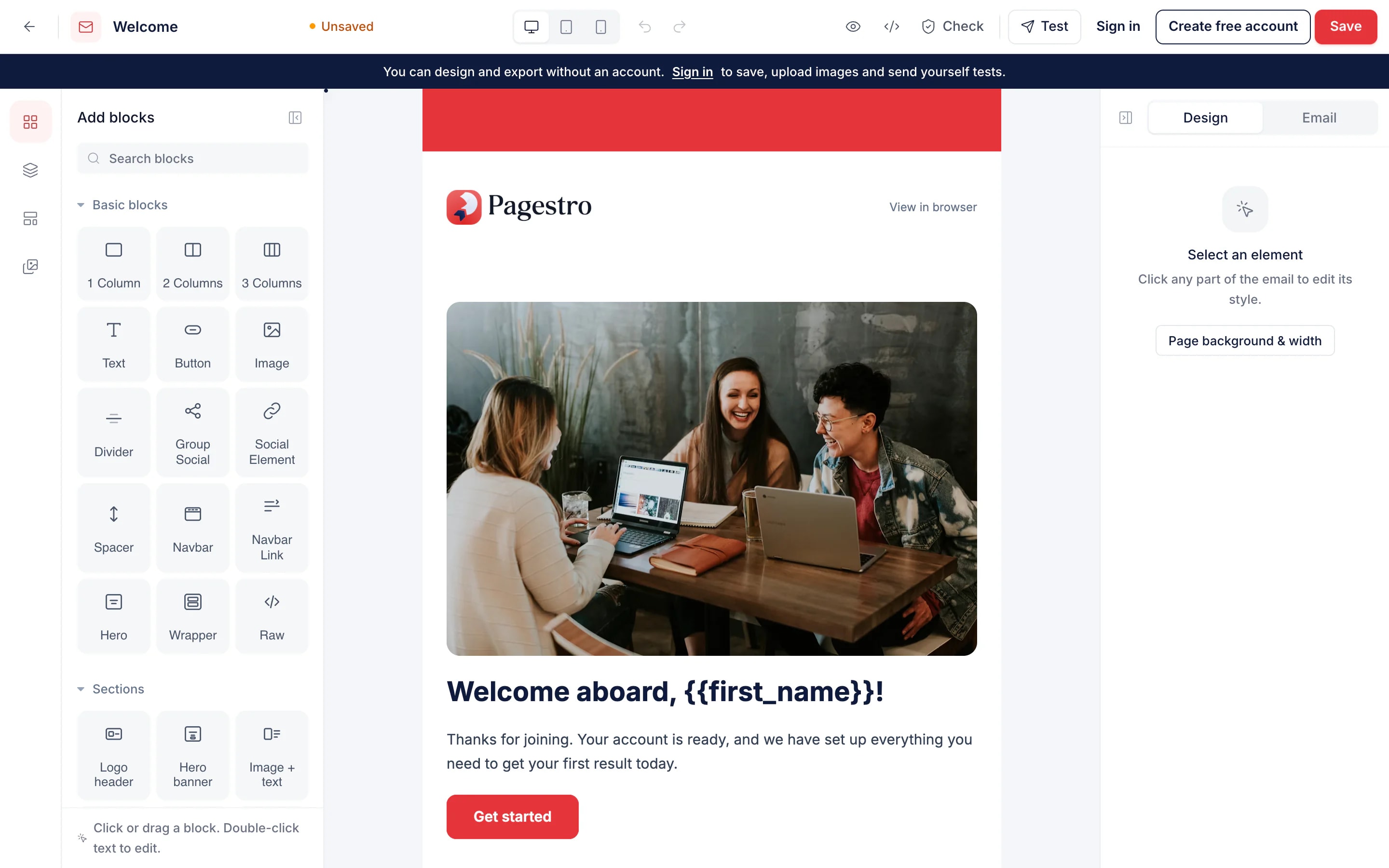
Add headings, text, images, buttons and columns, then click anything to change it.
Run the pre-send checks, then copy the HTML or download .html or .mjml.


- 1
Pick a starting point
Choose a template, a blank canvas, or import HTML or MJML you already have.
- 2
Drag in blocks and edit
Add headings, text, images, buttons and columns, then click anything to change it.
- 3
Check it and export
Run the pre-send checks, then copy the HTML or download .html or .mjml.
Features
Built for inboxes, not browsers
Design by dragging blocks.
Headings, text, images, buttons and columns. Every section stacks neatly on phones.
Merge tags.
Insert first name, company or unsubscribe link from the text toolbar.
Import your HTML.
Existing emails become editable blocks, with unsafe code removed.
Phone preview.
See the email at phone width before anyone else does.
Pre-send checks.
Flags emails Gmail would clip, images without alt text, empty or http links and a missing unsubscribe link.
Gmail dark mode preview.
Check how logos and colored sections look when the inbox turns dark.
Export to any email tool.
Copy the HTML, or download .html and .mjml files. Pagestro doesn’t lock your design in.
Pre-send checks
Fix it before it reaches the inbox
A broken link or a clipped footer is easy to miss and hard to take back. Before you export, Pagestro checks the size against Gmail’s limit, looks for missing alt text and preview text, and makes sure marketing emails have an unsubscribe link.
- Size check against Gmail’s 102 KB clipping limit
- Subject, preview text and alt text checks
- Empty, insecure and missing unsubscribe links flagged
Mobile first
See it the way phones will
Most email gets opened on a phone. Switch to the phone preview to check that columns stack, buttons are easy to tap and images scale down. Signed in, send yourself a test to see it in your real inbox.
- Desktop, tablet and phone previews
- Gmail dark mode preview
- Test sends to your inbox when signed in

Who uses it
Emails people actually open
Small businesses
Monthly newsletters.
A branded template you reuse every month.
Agencies
Templates for clients.
Build once, export HTML for whatever tool the client uses.
Nonprofits
Event invites and appeals.
Start from the event invitation template and add your details.
Developers
Receipts and support replies.
MJML source you can keep in your codebase and version.
How Pagestro compares
 Pagestro
Drag-and-drop editing
- Pagestro
- Yes
- Hand-coded HTML
- No
- Built-in platform editor
- Yes
Export HTML to any email tool
- Pagestro
- Yes
- Hand-coded HTML
- Yes
- Built-in platform editor
- Varies
Gmail clipping and alt-text checks
- Pagestro
- Yes
- Hand-coded HTML
- No
- Built-in platform editor
- Varies
Design and export without an account
- Pagestro
- Yes
- Hand-coded HTML
- Yes
- Built-in platform editor
- No
Cost to start
- Pagestro
- Free
- Hand-coded HTML
- Your time
- Built-in platform editor
- Usually tied to a plan
Finish the campaign
 Link ShortenerShorten links and track every clickOpen tool
 QR Code StudioGenerate custom branded vector QR codesOpen tool
 Compress ImageReduce image file size without quality lossOpen tool
 Resize ImageResize images by pixels or percentageOpen tool
 Convert ImageConvert images to JPG, PNG, WebP, GIF, SVG and moreOpen tool